
DMARC monitoring
Protect the domain behind every customer journey.
Your workflows depend on a trusted sending domain. SendOps turns aggregate DMARC reports into a clear view of who sends as your domain, what passes authentication, and what a stricter policy would affect. Review unknown sources, fix alignment problems, and tighten enforcement with evidence—not guesswork.
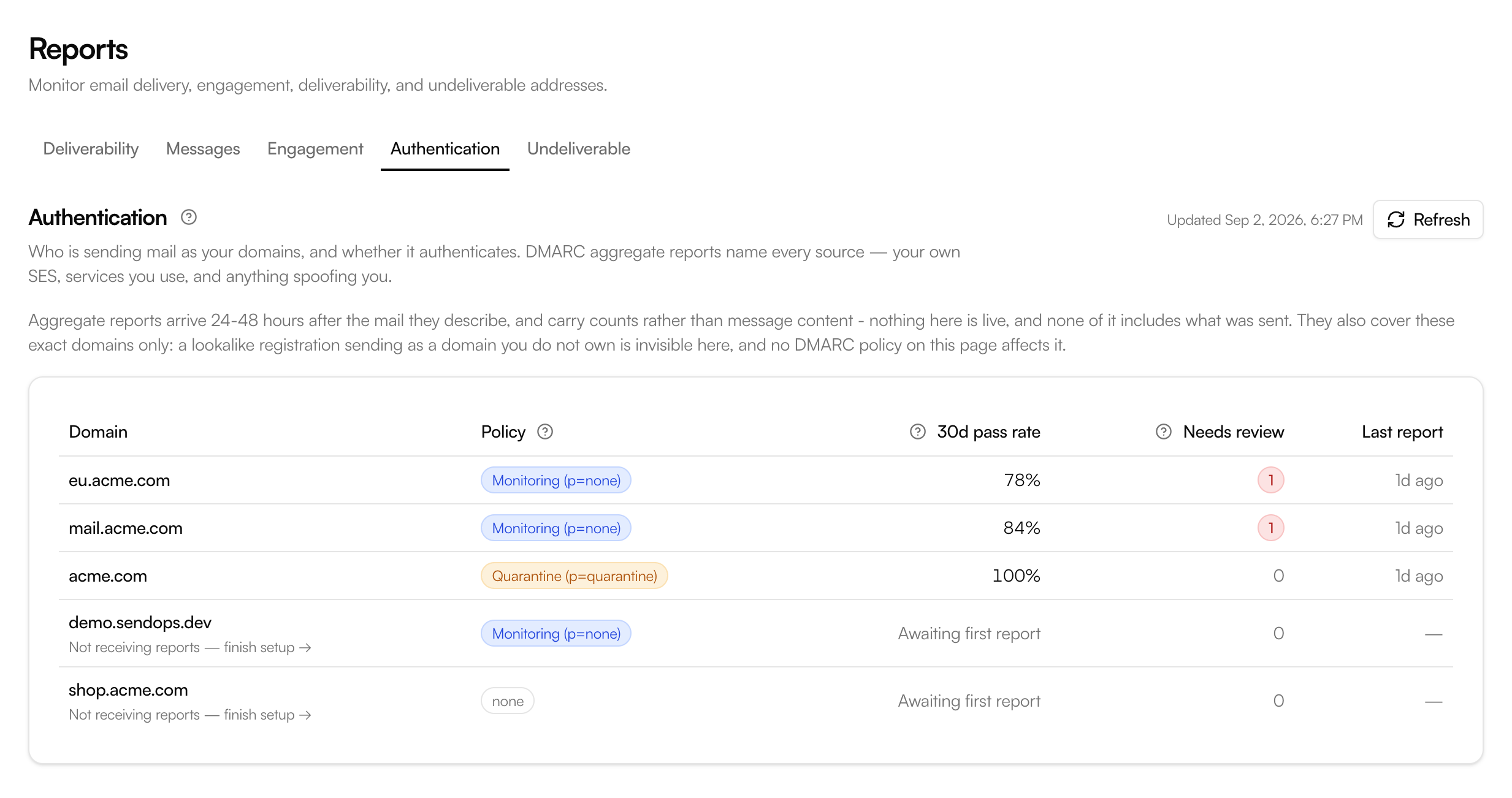
See DMARC policies, authentication pass rates, and domains that need attention in one view.
Every sending source
See SES, Google Workspace, Microsoft 365, SaaS tools, forwarders, and unknown senders in one domain view.
Actionable diagnoses
Find missing DKIM records, broken MAIL FROM setup, alignment failures, and suspicious sending patterns.
Safer enforcement
Measure what quarantine or reject would affect before changing your DNS policy.
Authentication alerts
Know when a new source appears, alignment drops, reports stop, or a policy quietly regresses.
From reports to decisions
Raw XML tells you what happened. SendOps tells you what to do next.
Mailbox providers send DMARC aggregate reports as batches of XML records and IP addresses. Reading them by hand means identifying networks, joining SPF and DKIM results, separating forwarding from spoofing, and repeating the work every day.
SendOps groups those records into recognizable sending sources, explains why authentication failed, and keeps the sources that need attention at the top of the queue. You get a working review process instead of another dashboard full of unexplained percentages.
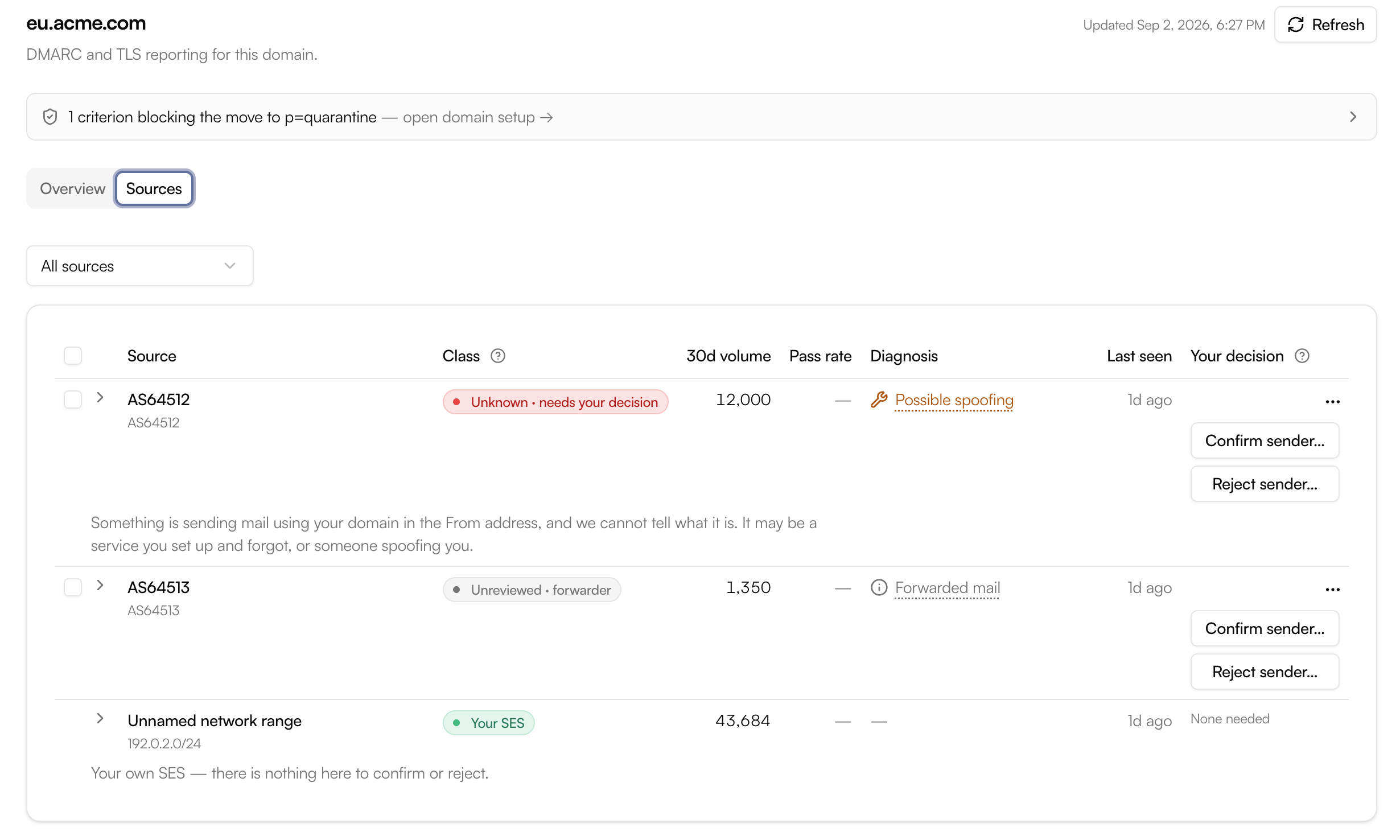
Source review
Know what is yours, what is broken, and what needs an answer.
An IP address is not a useful decision. SendOps groups related traffic and classifies each source by what it means for your domain.
Your SendOps sending
Mail proven to come from your SES identities through a DKIM key only your domain controls.
Your sending, not aligned
Legitimate SES mail with an authentication problem to fix. It is misconfigured, not malicious.
Known sender
A service your team has reviewed and confirmed, with its authentication state kept visible.
Unknown sender
A source that still needs a decision. It may be a forgotten service, forwarding, or unauthorized mail.
Reject records a decision. It does not block or hide the sender.
Marking a source as rejected tells SendOps that it is not yours. The source stays visible if it keeps sending, because that is exactly the traffic worth watching. Enforcement happens when you publish a stricter DMARC policy in DNS.
Explain the failure
Move from “DMARC failed” to the specific fix.
A failed message is only useful when you know why it failed. SendOps combines report evidence with live DNS checks to identify the configuration behind the result.
DKIM and MAIL FROM problems
See missing DKIM CNAMEs, an unset custom MAIL FROM domain, or MAIL FROM records that no longer resolve.
Third-party authentication gaps
Find services that send for you without signing as your domain, including Google Workspace or Microsoft 365 domains still relying on SPF alone.
Forwarding without false alarms
Separate ordinary forwarding from unauthorized sending so a broken SPF path is not automatically treated as an attack.
Spoofing patterns
Surface suspicious sources and distributed campaigns that spread traffic across many addresses to stay below per-source thresholds.
The policy ladder
Know when your domain is ready for enforcement.
Publishing p=none gives you visibility. Moving
to p=quarantine or p=reject is what asks receiving providers to act on mail that fails authentication.
SendOps measures the evidence for each step and shows what still blocks
the move.
Monitor with p=none
Collect reports without changing delivery. Build a complete picture of legitimate senders and authentication gaps first.
Move to p=quarantine
Ask receivers to treat failing mail as suspicious once coverage, source review, and measured impact say the move is safe.
Enforce with p=reject
Ask receivers to refuse failing mail after the domain has spent enough time at quarantine and no new risk has appeared.
See the cost before you publish.
SendOps shows which sources and how many messages a tighter policy would have affected over the measured window. If legitimate forwarded mail cannot be fixed, the cost is stated explicitly before the recommended record is revealed. The decision remains yours, and SendOps never changes DNS on your behalf.
Keep watching
Authentication is not a one-time setup task.
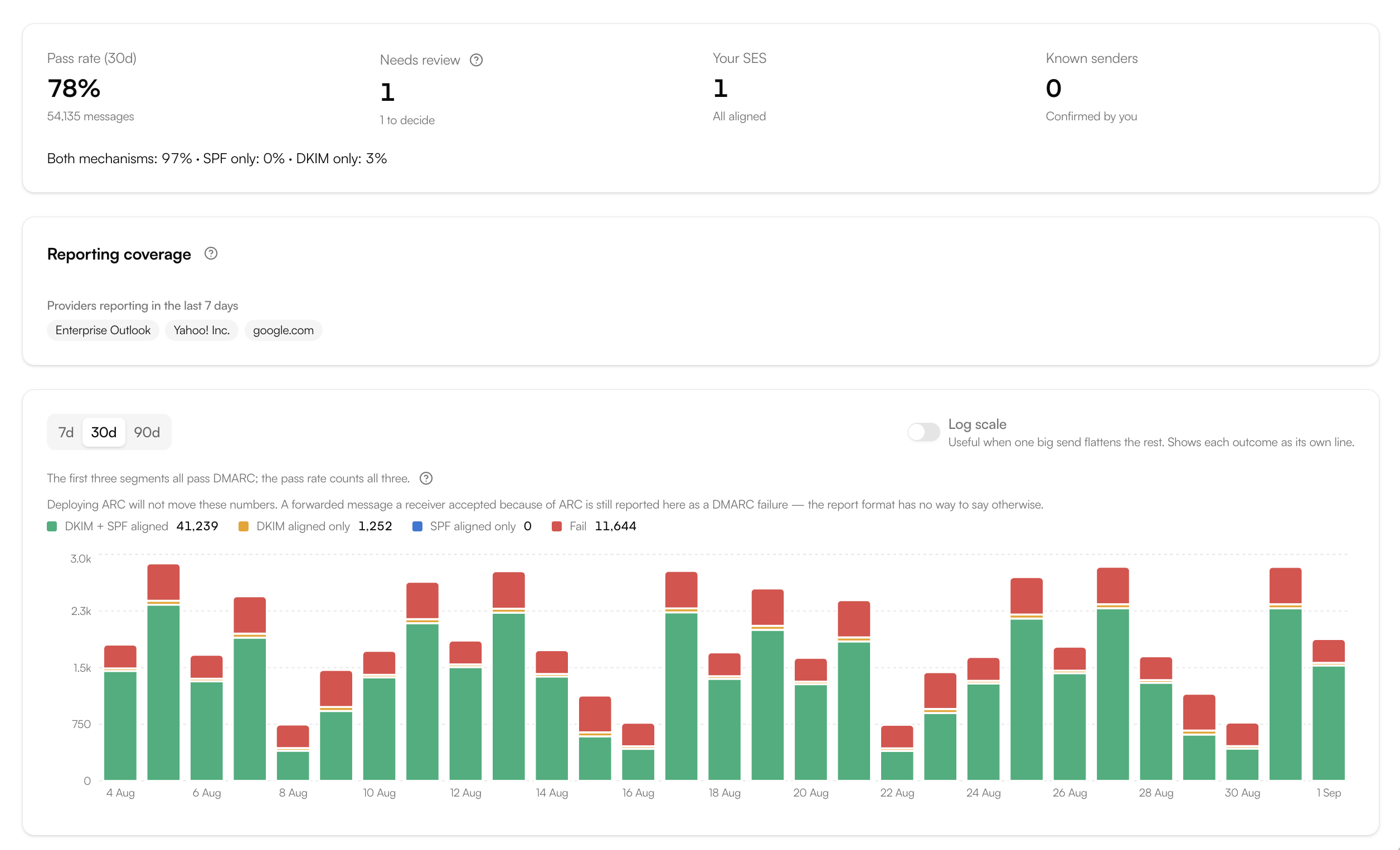
A new SaaS tool, a registrar edit, an expired DNS record, or a change at a sending provider can weaken a healthy domain without warning. SendOps keeps the current posture, trend, sending sources, and policy history together.
Alerts tell your team when an unknown source appears, alignment drops, reports stop arriving, setup breaks, or the published policy becomes weaker. The change history preserves the previous DMARC record and lets you compare the evidence before and after a policy change.
New source detected
Review a sender that has started using your domain.
Alignment dropped
Investigate a measurable fall in authenticated mail.
Reports stopped
Catch a broken or replaced reporting address before visibility disappears.
Policy ready
Know when the evidence supports moving to the next policy.
Delivery security
See when receiving systems cannot establish a secure mail connection.
DMARC explains whether a message aligned with your domain. SMTP TLS reporting, or TLS-RPT, covers a different part of the path: whether receiving mail systems could connect securely to the servers named in your mail-routing policy.
SendOps collects TLS reports alongside domain-authentication posture, groups delivery-security failures by type, and shows the trend over time. Keep the signals separate: a domain can pass DMARC while still having a TLS configuration problem, and a TLS failure does not by itself mean a message failed DMARC.
Programmable operations
Bring domain posture into the tools your team already uses.
Read DMARC posture, sources, diagnoses, and policy-readiness evidence through the SendOps Public API or native MCP server. Authorized tools can record source decisions with the same audit trail as the dashboard.
The safety boundary is the same everywhere: API and MCP tools do not publish DNS, advance a DMARC policy, or turn a rejected source into a network block. They expose evidence and record decisions; your team controls enforcement.
Aggregate reports only
Authentication visibility without collecting message content.
DMARC aggregate reports contain counts, sending IPs, authentication results, and the disposition applied by the receiver. They do not contain message bodies, subject lines, recipient addresses, or attachments.
SendOps deliberately does not request or process forensic reports. Those reports can carry recipient addresses, subject lines, and sometimes message content to an address published in public DNS. Aggregate data provides the evidence needed to identify senders and improve enforcement without that privacy cost.
Setup
One reporting address. No change to your sending path.
SendOps gives every verified domain an opaque reporting address that identifies no customer or domain in public DNS.
Copy the record
Open Infrastructure → Domain Auth and copy the exact TXT record prepared for your domain.
Publish it in DNS
Add the SendOps address to the rua tag in your existing DMARC record, or publish a new p=none record if you do not have one.
Let reports arrive
Most domains see their first aggregate reports within 24 to 72 hours. Low-volume domains can take longer because a provider with no mail to report sends nothing.
Review and improve
Confirm legitimate senders, fix authentication gaps, and use the readiness card when you are prepared to tighten the policy.
Publishing p=none does not affect delivery.
p=none requests aggregate reports and asks
receivers to make no delivery change. Quarantine and reject are separate
policy decisions made later.
Frequently asked questions
DMARC monitoring, in plain English.
What is DMARC monitoring?
DMARC monitoring collects aggregate reports from receiving mail providers and turns them into a view of the services sending as your domain. It shows whether SPF or DKIM aligned, which sources passed or failed, and what receivers did with the mail. SendOps groups the raw records into recognizable sources, diagnoses configuration problems, tracks changes, and alerts you when something needs attention.
Does DMARC monitoring affect email delivery?
Monitoring with a p=none policy does not change delivery. It asks receiving providers to send aggregate reports while continuing to handle mail as they already do. Delivery changes only when you deliberately publish p=quarantine or p=reject in DNS.
Does SendOps change my DMARC record or DNS?
No. SendOps shows the exact record to publish, checks the live result, and measures whether a stricter policy is safe. You or your DNS administrator make every DNS change. SendOps never publishes a DMARC policy on your behalf.
Does SendOps monitor only email sent through Amazon SES?
No. DMARC reports cover every source that uses your domain in the visible From address. That can include Amazon SES, Google Workspace, Microsoft 365, support tools, marketing platforms, billing systems, forwarders, and unauthorized senders. SendOps identifies its own SES sending precisely, then helps you review everything else.
What data is contained in a DMARC aggregate report?
An aggregate report contains counts, sending IP addresses, SPF and DKIM results, alignment results, and the disposition applied by the receiver. It does not contain message content, subject lines, recipient addresses, or attachments.
What is the difference between p=none, p=quarantine, and p=reject?
p=none requests reports without asking receivers to change delivery. p=quarantine asks receivers to treat mail that fails DMARC as suspicious, usually by placing it in spam. p=reject asks receivers to refuse failing mail during the SMTP conversation. SendOps helps you measure the likely impact before moving to either enforcement policy.
How long does it take for DMARC reports to appear?
Most domains receive their first aggregate reports within 24 to 72 hours after the reporting address is published. Providers send reports in batches, usually daily. A domain that sends very little mail may wait longer because providers that saw no messages have nothing to report.
Can SendOps identify email spoofing?
SendOps can surface unknown sources, suspicious unauthenticated traffic, and distributed patterns spread across many sending addresses. An unknown source is not automatically an attacker, so SendOps keeps the evidence visible for review. Publishing an enforcement policy such as p=quarantine or p=reject is what asks receiving providers to act on mail that fails authentication.
Does SendOps accept DMARC forensic reports?
No. SendOps accepts aggregate reports and deliberately does not request or process forensic reports. Forensic reports can contain recipient addresses, subject lines, and sometimes message content. Aggregate reports provide the source, volume, authentication, and disposition evidence needed for DMARC monitoring without collecting that message-level data.
Know who sends as your domain.
Start with reporting, fix what is misaligned, and move toward enforcement with a measured view of what changes at every step.